Tutorial
Auto-Generate Open Graph Images in Astro with Satori
· Updated · 8 min read
On this page
When someone shares your post on X, Slack, or Discord, the OG image is the first impression. A generic site-wide banner works, but a card that shows the actual post title is the difference between a link someone scrolls past and one they open — and once you have more than a handful of posts, hand-making images in Figma stops being fun.
This site generates one automatically for every post. Here’s the full setup: Satori turns a JSX-shaped object into SVG, resvg rasterizes it to PNG, and an Astro static endpoint runs both at build time. The output is plain PNG files in dist/ — no serverless function, no runtime cost, works on any static host (including Cloudflare Workers static assets, where this site runs).
Written July 2026, against the serif type this site shipped at the time. It has since moved to Inter, and the endpoint moved with it —
src/pages/og/[...path].png.ts, two static Inter weights, a shorter size ladder. The structure below and every gotcha in it are unchanged; only the font names and numbers differ from what the site serves today.
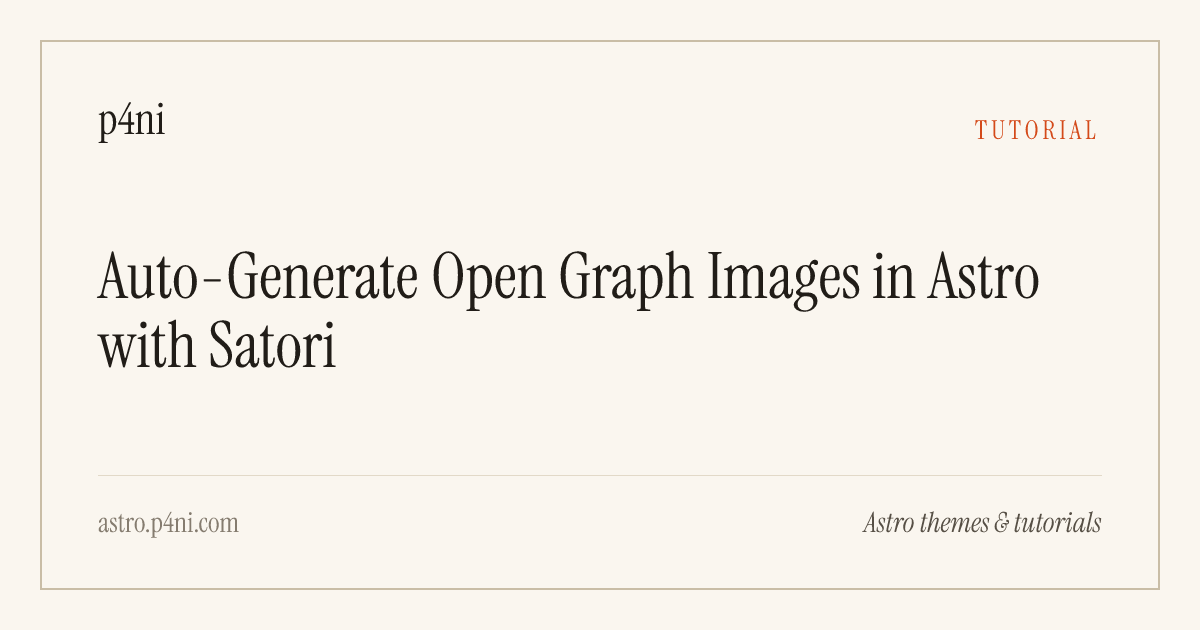
Here’s the card this post generates for itself:
Why Satori and not a headless browser?
The classic approach is screenshotting an HTML template with Puppeteer. It works, but it drags a full Chromium download into your build and adds seconds per image. Satori is a ~1 MB pure-JS layout engine: it supports a useful subset of CSS (flexbox, borders, gradients, text clamping) and lays out a card in tens of milliseconds. Rasterizing the SVG afterwards is what actually costs you — see §5 for the real per-card budget.
There’s also astro-og-canvas if you want a preset look with less control. I’m doing it directly because a theme maker’s OG card should match the site’s typography, and because the direct version is barely more code.
1. Install
pnpm add satori @resvg/resvg-js2. Fonts — the part that will actually bite you
Satori requires embedded font data for every glyph it draws, and it has two hard limitations:
- No
woff2. Onlyttf,otf, andwoff. - No variable fonts. You need static single-weight files.
If you use Fontsource as I do, check what’s actually in the package. @fontsource/instrument-serif ships both woff and woff2 — great. @fontsource-variable/* packages ship variable woff2 only — useless for Satori. (They’re shaped differently in another way too: they split by axis rather than by subset, which cost me 900 ms of render-blocking CSS before I noticed.) Copy the static woff files somewhere stable so your build doesn’t depend on node_modules internals:
mkdir -p src/assets/og
cp node_modules/@fontsource/instrument-serif/files/instrument-serif-latin-400-normal.woff src/assets/og/
cp node_modules/@fontsource/instrument-serif/files/instrument-serif-latin-400-italic.woff src/assets/og/
3. The endpoint
Create src/pages/og/[slug].png.ts. In Astro, a .png.ts file is a static endpoint: getStaticPaths enumerates every post, and the GET handler returns PNG bytes that Astro writes to dist/og/<slug>.png during astro build.
This assumes your posts sit directly in src/content/blog/. If you nest them — by locale, by year, by anything — the content layer’s post.id becomes en/my-post, and a value with a slash in it won’t go into a [slug] param. Use a rest param ([...path].png.ts) and strip the prefix yourself. That’s what this site does now, and it’s the one change that turns a copy-paste of the code below into a build error.
Satori accepts React elements, but you don’t need React (or a .tsx file) — it just reads { type, props: { style, children } } objects, so a tiny factory function is enough:
import { readFile } from 'node:fs/promises';
import path from 'node:path';
import type { APIRoute } from 'astro';
import { getCollection } from 'astro:content';
import satori from 'satori';
import { Resvg } from '@resvg/resvg-js';

const SITE = 'p4ni';
const TAGLINE = 'Astro themes & tutorials';
const DOMAIN = 'astro.p4ni.com';

export async function getStaticPaths() {
  const posts = await getCollection('blog', ({ data }) => !data.draft);
  return posts.map((post) => ({
    params: { slug: post.id },
    props: { post },
  }));
}

const fontDir = path.join(process.cwd(), 'src/assets/og');
const serifNormal = await readFile(path.join(fontDir, 'instrument-serif-latin-400-normal.woff'));
const serifItalic = await readFile(path.join(fontDir, 'instrument-serif-latin-400-italic.woff'));

// Satori consumes React-shaped objects; no JSX needed.
function el(
  type: string,
  style: Record<string, unknown>,
  children?: unknown
): Record<string, unknown> {
  return { type, props: { style, children } };
}

export const GET: APIRoute = async ({ props }) => {
  const { post } = props;
  const title: string = post.data.title;
  const category: string = post.data.category;

  // Scale the type down as titles get longer.
  const titleSize = title.length > 70 ? 56 : title.length > 45 ? 64 : 76;

  const card = el(
    'div',
    {
      width: '100%',
      height: '100%',
      display: 'flex',
      backgroundColor: '#faf6ef',
      padding: 40,
      fontFamily: 'Instrument Serif',
    },
    [
      el(
        'div',
        {
          width: '100%',
          height: '100%',
          display: 'flex',
          flexDirection: 'column',
          justifyContent: 'space-between',
          border: '2px solid #c9bda6',
          padding: '48px 56px',
        },
        [
          el(
            'div',
            {
              display: 'flex',
              justifyContent: 'space-between',
              alignItems: 'baseline',
              width: '100%',
            },
            [
              el('div', { fontSize: 44, color: '#211d18' }, SITE),
              el(
                'div',
                { fontSize: 26, color: '#d44a1a', textTransform: 'uppercase', letterSpacing: 4 },
                category
              ),
            ]
          ),
          el(
            'div',
            {
              display: 'flex',
              fontSize: titleSize,
              lineHeight: 1.08,
              color: '#211d18',
              lineClamp: 4,
            },
            title
          ),
          el(
            'div',
            {
              display: 'flex',
              justifyContent: 'space-between',
              width: '100%',
              borderTop: '1px solid #e2d9c8',
              paddingTop: 28,
            },
            [
              el('div', { fontSize: 28, color: '#857c6f' }, DOMAIN),
              el('div', { fontSize: 28, color: '#575046', fontStyle: 'italic' }, TAGLINE),
            ]
          ),
        ]
      ),
    ]
  );

  const svg = await satori(card as never, {
    width: 1200,
    height: 630,
    fonts: [
      { name: 'Instrument Serif', data: serifNormal, weight: 400, style: 'normal' },
      { name: 'Instrument Serif', data: serifItalic, weight: 400, style: 'italic' },
    ],
  });

  const png = new Resvg(svg, { fitTo: { mode: 'width', value: 1200 } }).render().asPng();

  return new Response(new Uint8Array(png), {
    headers: { 'Content-Type': 'image/png' },
  });
};
A few Satori-specific details in there:
- Every multi-child container needs
display: 'flex'. Satori only implements flexbox layout; it throws if an element has more than one child and no explicit display value. lineClamp: 4truncates long titles with an ellipsis instead of overflowing the card.- The font-size ladder (
76 → 64 → 56) keeps short titles punchy and long ones on the card. Crude, but it beats measuring text. Retune it if you change face: Inter is wider than Instrument Serif at the same size, which is why the live version steps down through60 → 52 → 46instead. - Fonts are read once at module scope, not per request — this file runs in Node during the build, so
node:fsis fine. - The constants are inlined above for readability. In the file this site ships, the site name and URL come from
src/consts.ts(the domain is derived withnew URL(SITE_URL).hostname), and the category runs through the i18n dictionary first, sobuild-in-publicrenders as “Build in Public” instead of the raw slug.
4. Wire it into your layout
Point each post’s og:image at the generated file. In your post page:
---
const ogImage = post.data.ogImage ?? `/og/${post.id}.png`;
---
<BaseLayout ogImage={ogImage} ogImageAlt={post.data.title} ogType="article" />
Keeping an ogImage frontmatter field as an override earns its two lines: some posts deserve a hand-made image, and the fallback (frontmatter → generated) costs nothing. Pages that aren’t posts — your homepage, tag pages — have no generated card, so give the layout a site-wide default to fall back on as well.
That same resolved path is worth reusing once more: BlogPosting’s image field wants it too, so whatever you compute here can feed the JSON-LD the page emits instead of being derived a second time.
In the layout head, emit the absolute URL plus dimensions — declaring width and height lets a scraper lay out the card before the bytes arrive:
<meta property="og:image" content={new URL(ogImage, Astro.site).href} />
<meta property="og:image:width" content="1200" />
<meta property="og:image:height" content="630" />
<meta property="og:image:alt" content={ogImageAlt} />
<meta name="twitter:card" content="summary_large_image" />
<meta name="twitter:image" content={new URL(ogImage, Astro.site).href} />
5. Verify
Run pnpm build and check the log — each image shows up as its own route:
├─ /og/astro-og-images-satori.png (+1.98s)
├─ /og/best-astro-directory-themes.png (+1.78s)
├─ /og/deploy-astro-to-cloudflare-workers.png (+1.85s)
Open the PNG from dist/og/ directly, then paste a deployed post URL into opengraph.xyz to see the real card. If you’re iterating on the design, pnpm dev serves the endpoint live at /og/<slug>.png — refresh the browser tab after each tweak instead of rebuilding.
Budget about 1.8 seconds per card — and note that the cost does not amortize. I assumed the first image would absorb a one-time initialization hit and the rest would be nearly free; the numbers above say otherwise, with the second and third cards priced the same as the first. On a three-post site that was 5.6s of a 6.7s build. It’s still the cheapest OG pipeline you can run, but at fifty posts you’re adding a minute and a half to every build, which is the point where caching the PNGs and regenerating only on a title change starts to pay for itself.
Gotchas recap
woff2and variable fonts silently don’t exist as far as Satori is concerned — convert or use staticwoff/ttf.- More than one child means an explicit
display: 'flex', every time. - Only a CSS subset is supported: no
grid, noposition: sticky, no pseudo-elements. Check the Satori README before designing something elaborate. - Emoji and CJK text need extra font data — every glyph must exist in a font you pass in.
- Draft posts: filter them in
getStaticPaths(as above) or you’ll generate images for posts that don’t exist publicly.
That’s the whole system: one endpoint file, two dependencies, two font files. Every future post on this site gets a branded card for free — the kind of small automation that compounds across the Astro themes I build.